

Inspection Workflow
Complete guide to the RGB and thermal inspection workflow: upload, gallery, pairs, viewer, tools, expert controls, and findings.
Purpose
The Inspection workflow is for reviewing image evidence, especially paired RGB and thermal captures. It supports upload, ingestion, gallery review, pair reconciliation, modal viewing, measurements, angle tools, thermal analysis, AI triage, findings, and expert settings.
Use this workflow when a reviewer needs to move from raw field capture to structured inspection decisions.
Inputs
- RGB images from drone or field capture.
- Thermal images where radiometric or thermal interpretation is needed.
- Metadata such as capture time, image dimensions, focal length, gimbal pitch, gimbal roll, gimbal yaw, camera heading, and range where available.
- Optional preconfigured finding taxonomy, severity model, and tenant quality settings.
Workspace Tabs
Inspection Viewer
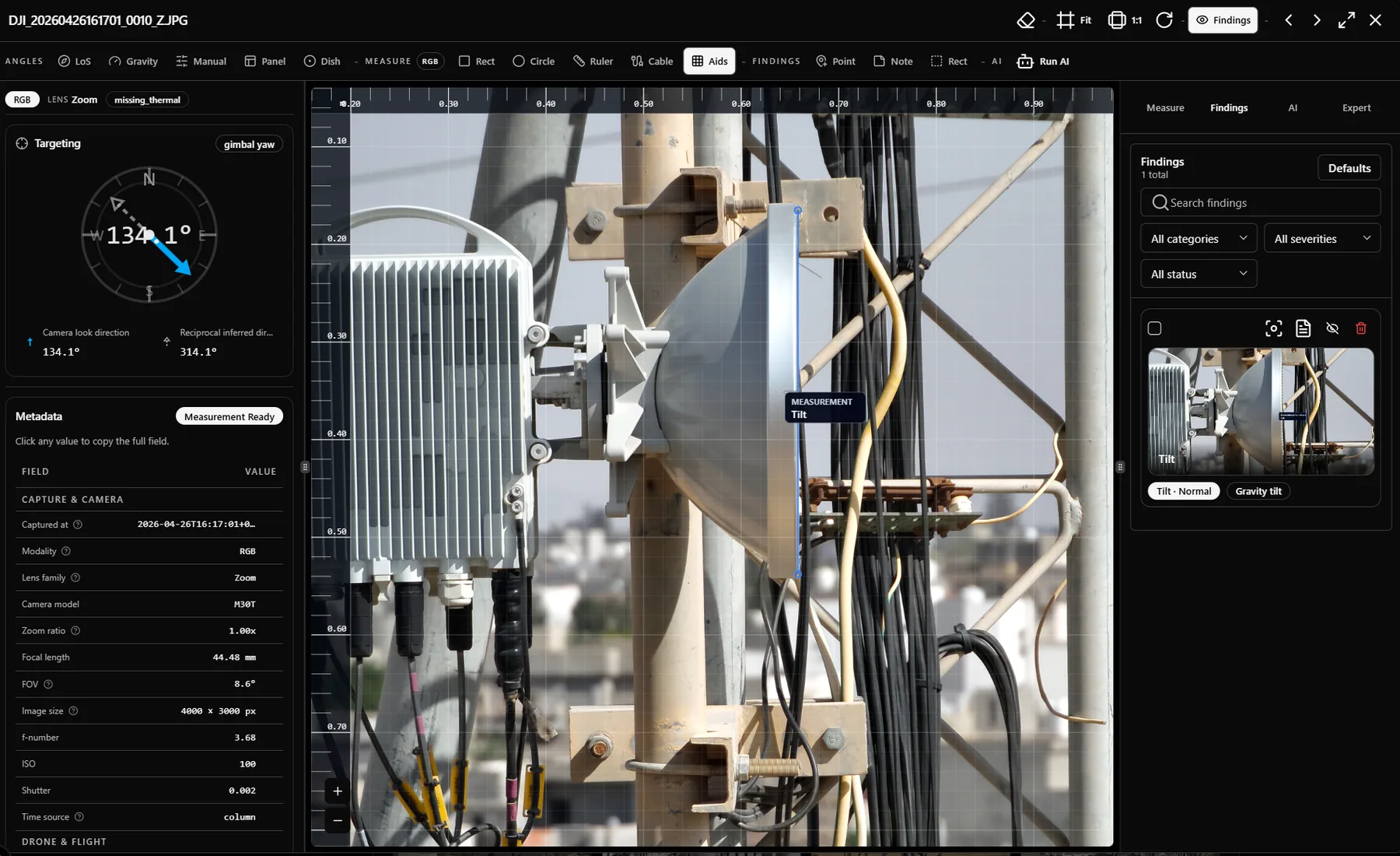
The viewer opens media in a resizable workspace. It has image viewport controls, zoom controls, overlay rendering, a top tool strap, a right rail for measurement, findings, AI, and expert controls, and canvas cards for editing selected findings directly where the evidence is visible.
- Single-image or paired review depending on available pair context.
- Finding overlays, note pins, AI overlays, pending measurement geometry, and angle guides.
- Resizable left, center, and right panels for reviewer preference.
- Local persistence for panel layout and selected expert settings where supported.
Outputs
- Structured findings with geometry, category, severity, status, title, notes, evidence, and audit context.
- Saved measurements and angle results that can be added to findings.
- Evidence captures that preserve what the reviewer saw in the viewer.
- Report-ready finding records for the reporting workflow.
Quality And Engineering Notes
Inspection measurements are only as good as the metadata and assumptions behind them. InSite surfaces readiness reasons, quality gates, calibration confidence, and source fields so reviewers can distinguish strong measurements from estimates.
Related Articles
Inspection Upload, Gallery, And Pairing
How to upload inspection files, review the gallery, reconcile RGB and thermal pairs, and recover from pairing problems.
Inspection Viewer Tools
Mini articles for inspection viewer tools: annotation, measurement, angles, thermal, AI, notes, overlays, and canvas findings.
Inspection Right Rail Tabs
Detailed explainer for the Inspection right rail: Expert tab, metadata context, findings, AI, measurement, quality, and calibration controls.
Measurement Accuracy And Confidence
How to think about image, map, and 3D measurement accuracy in InSite, including metadata, calibration, projection, and point density.